post · January 15, 2026 · 8 min read
Azure Front Door: A Practical Guide to Building a Global Edge (Standard vs Premium)
By Saleh Elnagar
If you run an internet-facing web app or API, you eventually need a “global edge”: one place where traffic enters, gets secured, and then gets routed to the right backend region reliably. On Azure, Azure Front Door (AFD) Standard/Premium is commonly the right answer for that job.
This post is written for platform engineers and cloud architects who want something more useful than a hello-world walkthrough: real-world patterns, common failure modes, and operational checklists you can use before go-live.
What Azure Front Door actually does (in one paragraph)
Azure Front Door is a global, layer-7 (HTTP/S) entry point that can:
- Terminate TLS for your public domains
- Apply WAF policies and request rules at the edge
- Route traffic to origins across regions (priority/weight/latency patterns)
- Optionally cache static content like a CDN (depending on configuration)
If you need global routing, WAF, and a single hostname for multi-region backends, AFD is usually a strong baseline.
When AFD is not the right tool
AFD is not a general-purpose ingress for every protocol or requirement. You may need something else when:
- You need layer-4 (TCP/UDP) load balancing at the edge (AFD is HTTP/S focused).
- You require mutual TLS (mTLS) with client certificates at the edge.
- Your app cannot tolerate a reverse proxy that might rewrite/normalize some headers unless explicitly configured.
Use AFD when your primary interface is HTTP/S and you want global behavior. Use regional ingress (Application Gateway, NGINX/Envoy in AKS, etc.) for region-local controls and app-specific routing needs.
Standard vs Premium: how to choose
The most durable way to choose is to start from the one feature that clearly separates the SKUs:
- Premium is required for Private Link from AFD to supported origins.
From there, treat Standard as “global HTTP edge + WAF + rules” and Premium as “Standard + private origin connectivity + additional security capabilities.” The exact security feature matrix evolves over time, so verify the current SKU comparison in Microsoft docs before you lock the decision.
Practical guidance:
- Choose Standard if your origins can be safely exposed behind tight origin lockdown (service tags + header validation) and you do not need Private Link.
- Choose Premium if you must remove public exposure from your origins (or strongly prefer private connectivity), or you need the Premium-only security capabilities your org requires.
Reference architectures that work in production
Pattern A: AFD in front of a regional L7 ingress (recommended for APIs)
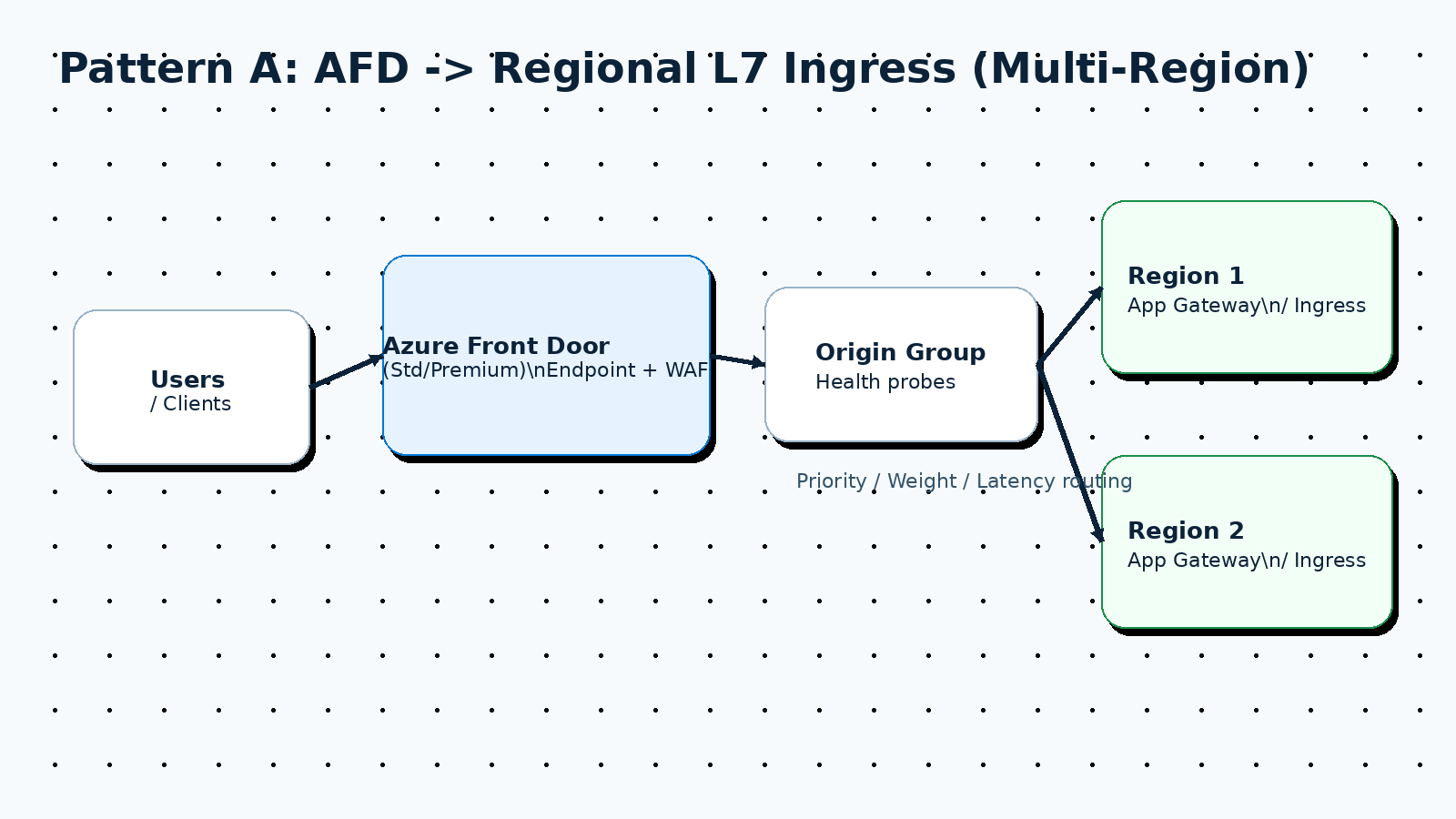
This pattern is popular for multi-region platforms because it splits responsibilities cleanly:
- AFD provides one global hostname, WAF, and global routing.
- A regional ingress (Application Gateway, NGINX Ingress, Envoy Gateway, etc.) handles app-specific L7 concerns and local service routing.
Typical flow:
- Client ->
api.example.com-> AFD - AFD -> Region 1 (active) / Region 2 (active or passive)
- Regional ingress -> services
Pattern B: AFD (Premium) directly to PaaS origins via Private Link
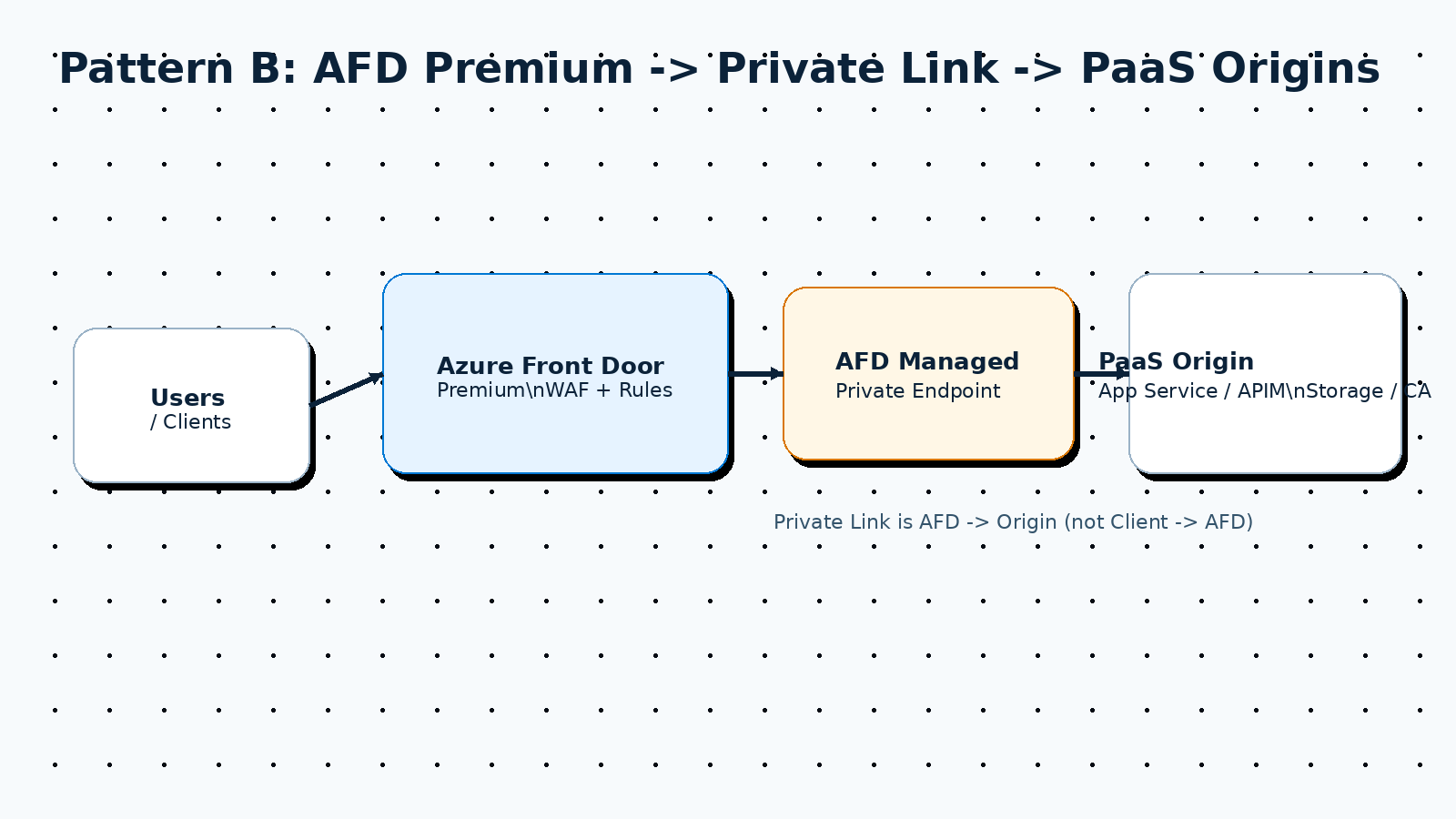
If you use supported origin types and want to avoid exposing them publicly, Premium enables Private Link connectivity from AFD to the origin. You still keep the public AFD endpoint, but the AFD-to-origin hop can be private.
Operational note: Private Link connections require an approval step. Plan for that in your provisioning flow.
Pattern C: “Break-glass” alternate ingress for rare edge outages
Most systems do not need this. If your risk model requires a manual failover path around AFD (for example, to a secondary global ingress), plan it explicitly:
- BYO certificates (do not depend on certificates that cannot be exported)
- Runbooks and DNS TTL strategy
- A practiced manual cutover procedure
The most common production issue: the “three-hostname problem”
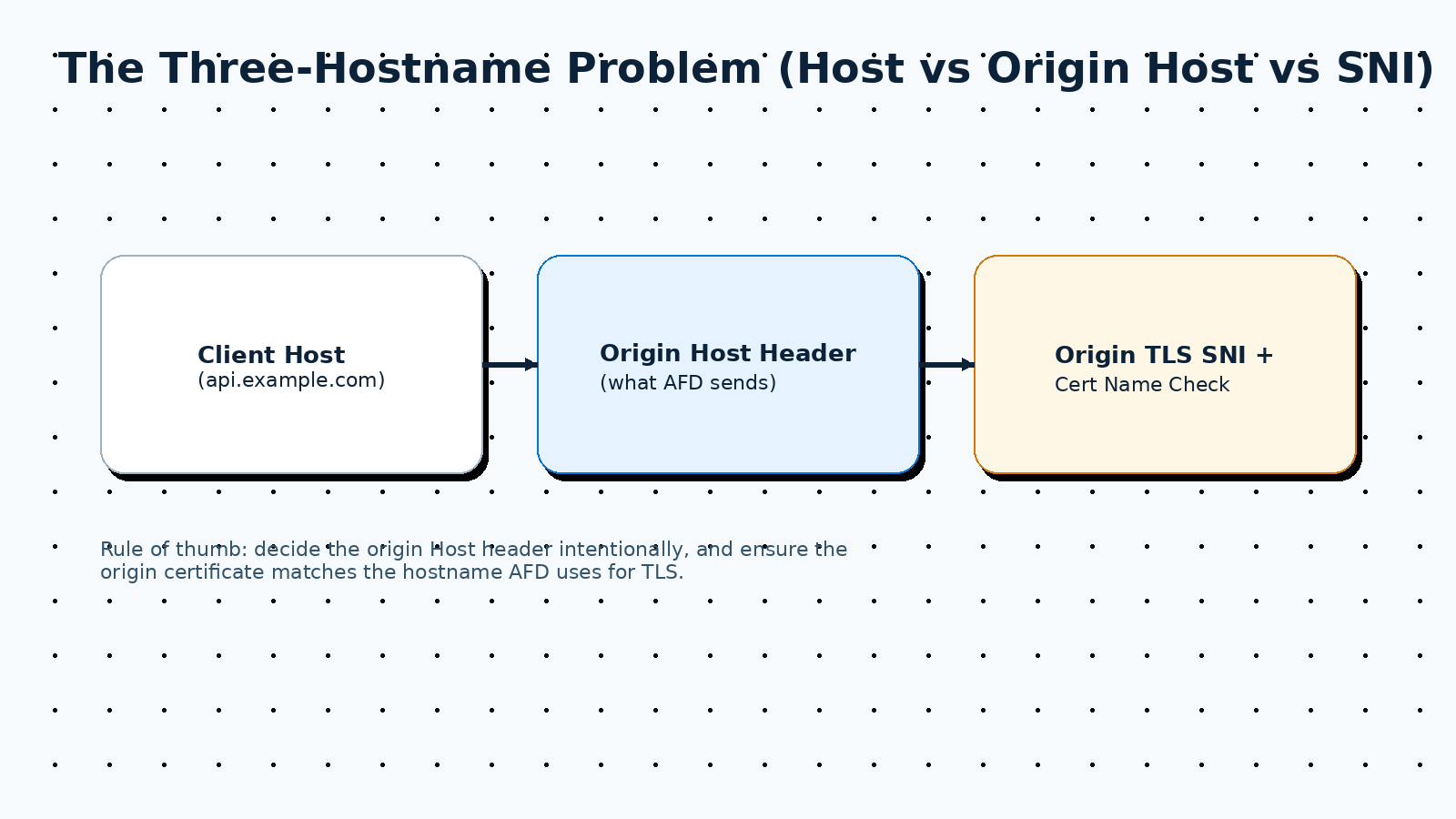
A large share of real AFD incidents come from mixing up these three values:
- Client Host header (what the browser/API client sends)
– Example:
api.example.com - Origin Host header (what AFD sends to your backend) – This is configurable. If you leave it unset, AFD may pass through the incoming Host header.
- TLS SNI / certificate name check to the origin – AFD connects to the origin over TLS. The origin must present a certificate that matches the hostname AFD uses.
Where this blows up:
- Your origin expects
myapp.azurewebsites.netas Host, but AFD forwardsapi.example.com. - Your origin certificate is valid for
regional-gw.contoso.net, but AFD is configured to connect to10.0.0.4or another name that does not match the cert.
Hard rule: Decide deliberately what Host header the origin should receive, then align origin TLS certificates and routing accordingly.
Origin security: do not leave origins open to the internet
Even with WAF at the edge, assume attackers will try to bypass AFD and hit your origin directly. “Origin lockdown” is mandatory.
Option 1: Lock down public origins (no Private Link)
At a minimum, do both:
- Restrict inbound traffic to the origin to Azure Front Door backend egress ranges (service tags) where supported.
- Require an application-layer secret/identifier that only AFD sends (commonly done by validating an AFD-specific header).
Why both? IP allow-lists alone are often not enough (shared infrastructure and changing ranges). Header validation alone is not enough if someone can send the same header to your public origin. Combining them is significantly stronger.
Option 2: Use Private Link to origins (Premium)
If you can use Private Link, you can remove public exposure from supported origins. Still do defense-in-depth (cert validation, least-privilege, and app-level checks), but your baseline posture is better.
WAF: how to roll it out without breaking production
Treat WAF as an operational system, not a checkbox.
Recommended rollout:
- Start in Detection mode in non-prod (or limited prod scope) to measure false positives.
- Move to Prevention with a written rollback plan and an owner for tuning.
What to implement early:
- Rate limiting on sensitive endpoints (login, token issuance, expensive searches)
- Allow/deny lists for admin paths
- Geo restrictions if your business model supports it
Avoid:
- A giant set of exclusions with no owner. Every exclusion should have a reason and a review date.
Observability you should enable on day one
AFD problems are hard to debug if you do not have logs from the start.
Enable:
- Access logs (requests, status codes, latency)
- WAF logs (blocked/matched rules)
- Health probe logs (origin health and probe failures)
Operational habit:
- Pick one request correlation identifier and use it in incident response. AFD provides tracking headers; ensure your origin logs them too.
TLS and certificates: make rotation a design requirement
At the edge:
- Prefer a single certificate strategy for your public domains (managed vs BYO).
- If you need advanced failover patterns or sharing certs across ingress providers, plan on BYO certificates.
To the origin:
- Keep certificate validation enabled whenever possible.
- Ensure the origin certificate matches the hostname AFD uses to connect.
- Treat “it works in the portal” as insufficient; test renewal/rotation in a lower environment.
Terraform starter (minimal shape)
Below is a high-level skeleton (not a full module) to show the moving pieces you will typically manage:
terraform {
  required_providers {
    azurerm = {
      source  = "hashicorp/azurerm"
      version = ">= 4.0.0"
    }
  }
}

provider "azurerm" {
  features {}
}

# 1) Front Door profile (Standard or Premium)
resource "azurerm_cdn_frontdoor_profile" "this" {
  name                = "afd-${var.name}"
  resource_group_name = var.resource_group_name
  sku_name            = var.sku_name # Standard_AzureFrontDoor or Premium_AzureFrontDoor
}

# 2) Endpoint
resource "azurerm_cdn_frontdoor_endpoint" "this" {
  name                     = "ep-${var.name}"
  cdn_frontdoor_profile_id = azurerm_cdn_frontdoor_profile.this.id
}

# 3) Origin group + origins
resource "azurerm_cdn_frontdoor_origin_group" "api" {
  name                     = "og-api"
  cdn_frontdoor_profile_id = azurerm_cdn_frontdoor_profile.this.id

  health_probe {
    interval_in_seconds = 30
    path                = "/healthz"
    protocol            = "Https"
    request_type        = "GET"
  }
}

resource "azurerm_cdn_frontdoor_origin" "api_r1" {
  name                          = "api-r1"
  cdn_frontdoor_origin_group_id = azurerm_cdn_frontdoor_origin_group.api.id
  host_name                     = var.origin_r1_hostname
  origin_host_header            = var.origin_host_header
  https_port                    = 443
  enabled                       = true
  priority                      = 1
  weight                        = 1000
}

# 4) Route (maps endpoint paths to origin group)
resource "azurerm_cdn_frontdoor_route" "api" {
  name                          = "route-api"
  cdn_frontdoor_endpoint_id     = azurerm_cdn_frontdoor_endpoint.this.id
  cdn_frontdoor_origin_group_id = azurerm_cdn_frontdoor_origin_group.api.id
  cdn_frontdoor_origin_ids      = [azurerm_cdn_frontdoor_origin.api_r1.id]

  supported_protocols    = ["Http", "Https"]
  patterns_to_match   = ["/*"]
  forwarding_protocol = "HttpsOnly"
  link_to_default_domain = true
  https_redirect_enabled = true

  # Add a `cache {}` block only for static paths. For most APIs, omit caching entirely.
}
For production, you will usually add:
- Custom domains + certificate settings
- WAF policy + security policy association
- Rules engine (header rewrites, redirects, path-based routing)
- Diagnostic settings to Log Analytics
- Private Link settings (Premium) where applicable
Troubleshooting: the failures you will see in real life
Symptom: 502/503 from AFD
Common causes:
- Origin TLS mismatch (certificate does not match the hostname AFD uses)
- Origin health probe failing (wrong path, auth required, slow response)
- Private Link not approved yet (when using Premium)
Triage checklist:
- Check health probe logs first.
- Validate origin Host header and origin certificate name.
- Temporarily bypass WAF to isolate edge security vs origin availability issues (with care).
Symptom: 403 loops or unexpected blocking
Common causes:
- WAF is blocking a legitimate request (false positive)
- Origin lockdown is blocking AFD (misconfigured service tags or header validation)
Triage checklist:
- Compare access logs vs WAF logs for the same request.
- Verify the origin is receiving the expected AFD headers.
Symptom: wrong backend/tenant (multi-tenant gateways)
Common cause:
- Host header rewrite: your gateway routes by Host, but AFD is forcing a fixed origin Host header.
Fix:
- Preserve Host end-to-end when your origin routing depends on it, and ensure the regional ingress has a certificate that matches that Host.
Go-live checklist (copy/paste)
- Origin host header and origin TLS certificate name are aligned.
- Health probe path returns fast, unauthenticated success.
- Origin is locked down (not reachable directly from the internet).
- WAF deployed with a tuning and rollback plan.
- Logs enabled and flowing to your SIEM/Log Analytics.
- Certificate rotation validated in a lower environment.
- Failover behavior tested (region down drill).
Closing
AFD is powerful, but the “easy demo” path is not the same as a reliable production edge. If you treat host headers, TLS, and origin lockdown as first-class design constraints (and you turn on logs early), AFD becomes a very solid foundation for global apps on Azure.
Quick AI Summary
If you run an internet-facing web app or API, you eventually need a “global edge”: one place where traffic enters, gets secured, and then gets routed to the right backend region reliably. On Azure, Azure Front Door (AFD) Standard/Premium is commonly the right answer for that job.
Original article body above remains unchanged.
Continue Reading
Related Posts
Ingress migrations are rarely “just routing.” They’re one of the few moments where you’re forced to touch the edge, which means you can also fix the stuff that quietly rots over time: The core move is simple: Don’t migrate YAML → YAML. Migrate to a desired state — and encode that state as Terraform. This […]
Repository: https://github.com/SalehElnagar/azure-terraform-conventions This article walks through how to think about Azure naming conventions and how to turn those decisions into code using the azure-terraform-conventions GitHub repository. That repo contains: The goal is not “just use whatever the repo does”. The goal is: capture your organization’s naming decisions once, codify them with this library, and then […]
When I sit down to craft a Terraform module, I ask myself how future me—and the teams inheriting my code—will reason about every decision. I remind myself to start with clarity, keep security opinionated but flexible, and prove the workflow end to end before anyone else runs terraform apply. I literally keep a checklist on […]
Get New Playbooks Weekly
Join the newsletter for practical Azure, Terraform, and DevSecOps guides. One actionable email per week.
Comments
Enable comments by setting NEXT_PUBLIC_GISCUS_* environment variables.